The Queens County court docket is the official record of scheduled hearings, motions, and trials in Queens County courts. It provides a detailed view of hearing dates, Queens ‘ daily proceedings, and docket entries, making it a key resource for attorneys, litigants, and the public. Each docket entry shows case numbers, parties involved, and the type of proceeding, ensuring clarity in court operations. Users can track civil, criminal, and family cases through this centralized schedule. The docket also highlights motion calendars and trial dates, helping legal professionals plan effectively. By reviewing the docket regularly, parties stay informed of changes and avoid missing critical hearings.
A well-maintained Queens Courts calendar helps track court activity across Queens County, including upcoming motions, trial dates, and overall case progress, while organizing daily schedules to make it easier to locate specific cases or proceedings. The docket provides precise hearing times and procedural deadlines, reducing scheduling conflicts and delays, which allows attorneys to prepare filings and manage cases efficiently. For the public, Queens Courts’ scheduling information promotes transparency by offering insight into official court operations and helping users understand how cases progress through the Queens County court system.
What Is the Queens County Court Docket?
The Queens County Court docket is an official record of all cases scheduled in the court. It lists upcoming hearings, case events, and filings so that parties, attorneys, and the public can track proceedings efficiently.
A court docket functions as a daily roadmap of the court’s activity. Each entry represents a specific action, motion, or hearing related to a case. These entries provide a clear timeline of when events occur and which matters are scheduled before the judge. For example, a docket may include motions filed, trial dates, pre-trial conferences, and other significant case developments. Having access to a daily docket allows attorneys and litigants to plan effectively and ensures transparency in the legal process.
Types of Docket Entries
Docket entries vary depending on the type of case and the court’s activity. Common entries include:
- Filing Events: New complaints, motions, or petitions submitted to the court.
- Hearings: Scheduled court appearances, including status conferences, arraignments, and trials.
- Orders and Judgments: Decisions issued by the court, such as approvals, denials, or sentencing.
- Continuances or Cancellations: Updates when hearings are postponed or rescheduled.
Each entry is typically timestamped and linked to a case number. This allows interested parties to follow the case status in Queens and anticipate upcoming steps. Legal professionals often rely on these entries to prepare arguments, while members of the public may use them to confirm court activity.
How the Docket Relates to the Hearing Schedule
The docket is closely tied to the court’s hearing schedule. While the docket records all filings and motions, the hearing schedule highlights the dates when cases will actually appear in court. By consulting the docket, users can see:
- Which cases are scheduled for today, tomorrow, or the coming weeks?
- The sequence of hearings and their respective times.
- Any updates, such as delays or changes in courtroom assignments.
Many court systems provide an online docket listing to improve accessibility. This listing often includes a brief description of each case, the parties involved, and the status of motions. Checking the docket regularly ensures that attorneys and litigants stay informed about changes in case timelines and upcoming hearings.
Tips for interpreting docket entries:
| Entry Type | Meaning | Example |
|---|---|---|
| Motion Filed | A formal request submitted to the court | Motion to dismiss |
| Hearing Scheduled | Court appearance is set | Preliminary hearing on 01/10/2026 |
| Order Issued | Court decision or instruction | Judge grants motion for continuance |
| Case Closed | Matter concluded | Final judgment entered |
How to Search the Queens Court Docket Online
Searching the Queens County Court docket requires a few simple steps to ensure accurate results. By knowing the correct method, users can quickly find case information, track hearings, and view filings without unnecessary delays.
Correct Method for Searching Court Records
To search effectively:
- Know what you are looking for – either a case number or the party name involved. Having these details helps narrow results.
- Choose the right search tool – Queens County offers both WebCrims for detailed case history and eCourts Queens for calendar-based searches.
- Use filters wisely – select the court type, date range, and other fields to prevent irrelevant results.
- Check spelling carefully – incorrect spellings of names, abbreviations like “Inc.”, or missing middle initials can cause missed results.
- Review results carefully – confirm that the case or hearing matches your intended search by checking the docket entries and scheduled dates.
Following these steps reduces errors and ensures that users get the most accurate and relevant information.
Where to View Court Records
Queens County provides multiple options for viewing court records online. Each platform has unique features and costs:
1. WebCrims: A detailed docket lookup tool for criminal and civil cases. Users can see motions, filings, and full case histories.
- Access: https://iapps.courts.state.ny.us/webcrim_attorney/CaseIdentifierSearch

- Features: Case tracking, docket entries, motion history
- Best for: Users needing complete case information
- Cost: Free
2. eCourts Queens: Provides court calendar search by court type and date range. Useful for checking upcoming hearings.
- Access: https://iapps.courts.state.ny.us/webcrim_attorney/AttorneyCalendar
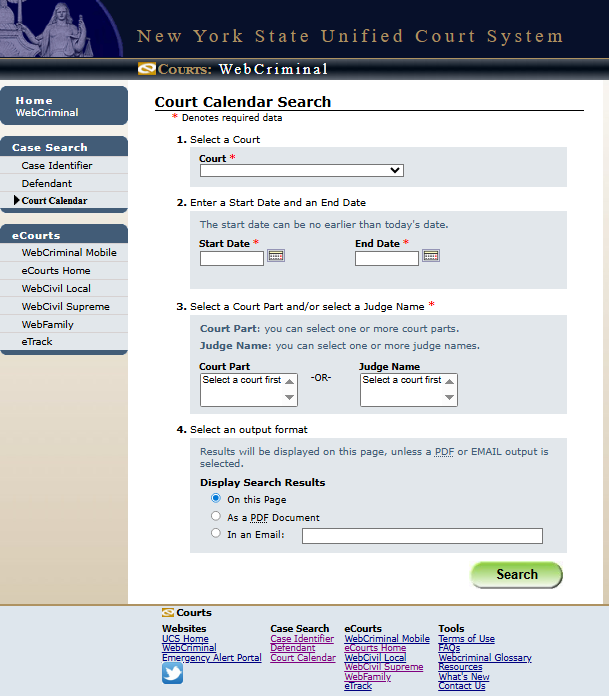
- Features: Hearing schedules, court calendar search
- Best for: Quick reference to upcoming court dates
- Cost: Free
3. Requesting Documents: Some records, like certified copies or full case files, may require downloading or official requests.
- Download fees: Typically $0.50–$1 per page (varies by record type)
- Certified copies: Usually $5–$10 per document
These resources allow users to check case information online or obtain official documents for legal, personal, or professional purposes.
The Queens Court Calendar
The Queens Court calendar provides a detailed schedule of hearings, trials, and other court events across the borough. It allows attorneys, litigants, and the public to check daily proceedings and plan accordingly.
The calendar is officially maintained through systems like WebCrims and eCourts, which track cases across Queens County. These platforms provide accurate information for criminal, civil, and surrogate court matters, offering a centralized view for anyone needing to reference a daily docket. Users can perform a court calendar search to see upcoming cases by date, case type, or court division.
Daily vs Weekly Court Schedules
Queens County courts organize proceedings into daily and weekly schedules. The daily docket lists all cases set for a specific day, including times, courtroom numbers, and involved parties. This helps attorneys and litigants prepare for immediate hearings.
The weekly calendar gives a broader view, showing cases across the week. This format is useful for tracking multiple hearings, managing court workloads, or planning longer-term legal actions.
Key features include:
- Case type filters: View criminal, civil, or surrogate court hearings.
- Courtroom assignment: Each case lists its assigned courtroom.
- Judge information: Identifies the presiding judge for each case.
- Status updates: Notes continuances, adjournments, or cancellations.
Types of Queens Court Calendars
Queens County maintains several specialized calendars to reflect the nature of cases.
- Criminal Court Calendar: Covers felony and misdemeanor cases, arraignments, and motions.
- Civil Court Calendar: Lists civil disputes, including contract issues, personal injury, and small claims.
- Surrogate Court Calendar: Focuses on probate, estates, and guardianship matters.
Each calendar is designed to allow users to perform a docket lookup efficiently. For instance, attorneys often check the criminal calendar daily to confirm courtroom schedules, while family law practitioners may focus on civil or surrogate listings.
Using Official Online Tools
Queens County offers online platforms for quick reference and updates:
| Tool | Purpose | Notes |
|---|---|---|
| WebCrims | Access criminal court calendars and case details | Updated daily with new filings and motions |
| eCourts | View civil and surrogate court schedules | Supports keyword search for case numbers |
By using these tools, anyone can stay informed about the court schedule for Queens County, from trial dates to adjourned hearings. Reliable access ensures accurate planning and reduces missed appearances.
Daily Docket & Hearing Schedule Explained
The Queens County daily docket lists all court events and hearing dates scheduled for each day, helping attorneys, litigants, and the public track case progress. It clearly separates criminal and civil matters and organizes hearings by time, making the court calendar predictable and easy to follow.
A typical day at Queens County Court starts early, often around 9:00 AM, and continues until late afternoon. Each hearing is assigned a specific time slot, usually in 15- or 30-minute increments. For example, the criminal docket might schedule arraignments and bail hearings in the morning, while the civil docket often reserves afternoons for motions, family matters, or small claims. Many of these proceedings generate Public Records, including case filings, court calendars, and hearing outcomes, which help document the court’s daily operations. Public Records provide transparency by allowing the public to review non-confidential information related to cases handled throughout the day. This structure allows the court to manage multiple cases efficiently while keeping participants informed.
How Criminal and Civil Dockets Differ
Criminal and civil cases follow distinct scheduling practices.
- Criminal Docket: Focuses on cases where charges are brought against individuals or organizations. Events often include arraignments, pre-trial conferences, motion hearings, and trials. Times are strictly assigned, and the sequence generally prioritizes serious or time-sensitive matters.
- Civil Docket: Handles disputes between parties, such as contract issues, personal injury claims, or property disagreements. Civil hearings may be slightly longer, often including settlement conferences, mediation sessions, or summary judgments.
Both dockets are arranged to maintain order and prevent conflicts between cases. Hearing dates in Queens County are listed on the docket calendar according to filing order, with earlier filings typically appearing first unless the court determines otherwise.
Sample Daily Timeline
Here is an example of how a Queens County hearing timetable might look:
| Time | Case Type | Event Description |
|---|---|---|
| 9:00 AM | Criminal | Arraignment for Smith v. State |
| 9:30 AM | Criminal | Bail hearing for Johnson |
| 10:00 AM | Civil | Motion hearing in Brown v. Lee |
| 11:00 AM | Criminal | Pre-trial conference for Davis |
| 1:00 PM | Civil | Family court custody hearing |
| 2:00 PM | Civil | Small claims trial: Robinson v. Kim |
| 3:00 PM | Criminal | Sentencing in State v. Allen |
This sample illustrates the hearing timeline and how the court balances criminal and civil matters throughout the day. Calendared events are displayed in advance, allowing participants to prepare and plan accordingly.
What It Is & How to Find Motion Hearings
A motion calendar is a scheduled list of court hearings where judges review and decide motions filed by attorneys or self-represented parties. It provides the official dates for when specific motions will be addressed, helping parties track hearing dates in Queens and monitor their docket entries.
What a Motion Calendar Includes
In Queens County, a motion calendar is a key part of the court docket. It outlines upcoming hearings for procedural requests, such as:
- Requests to change court orders
- Applications for temporary relief
- Motions to dismiss or amend a case
These calendars are often organized by case type—civil, criminal, or family—and list cases in the order they will be heard. Each entry typically includes the case number, party names, motion type, and scheduled hearing date.
Typical Motion Calendar Days and Deadlines
Queens courts usually set motion calendars on specific days of the week, depending on the court and case type. For example:
| Court Type | Common Motion Days | Filing Deadline |
|---|---|---|
| Civil | Monday, Wednesday | 5 business days before the hearing |
| Criminal | Tuesday | 7 business days before the hearing |
| Family | Thursday | 7 business days before hearing |
Deadlines matter because the court will only schedule motions that are filed in time. Late filings may result in the motion being postponed to a later calendar. This system keeps the motion hearing schedule organized and ensures fair notice for all parties.
How the Motion Calendar Impacts the Docket
The motion calendar directly influences a case’s overall docket entries. Each motion hearing is recorded in the docket, showing when motions are filed, scheduled, and resolved. This information helps parties track progress and anticipate court activity.
Key effects include:
- Timeline clarity: Parties can see when decisions are expected.
- Case management: Judges prioritize motions to prevent delays.
- Public record: All hearings are logged for transparency and reference.
Courts often provide online access to motion calendars, so parties can check hearing dates in Queens anytime. Tools like WebCrims and eCourts offer up-to-date calendars, showing the next available hearings for each case.
Upcoming Hearing Dates in Queens County Court
Queens County Court schedules hearings regularly for both criminal and civil matters. Hearing dates are announced in advance, and docket entries indicate when each case will be addressed. The court typically follows predictable patterns, helping attorneys, parties, and the public anticipate upcoming sessions. Notice periods vary depending on the type of case, but most hearings are scheduled at least a few weeks in advance. Understanding these patterns can help plan attendance or filings efficiently.
Typical Hearing Times for Criminal and Civil Cases
In Queens County, criminal hearings often occur in the morning or early afternoon. Common slots include:
- Pre-trial conferences: 9:00 AM – 11:00 AM
- Arraignments: 10:00 AM – 12:00 PM
- Motion hearings: 1:00 PM – 3:00 PM
Civil matters, such as small claims or family disputes, are frequently scheduled later in the day:
- Civil conferences: 10:30 AM – 12:30 PM
- Settlement conferences: 2:00 PM – 4:00 PM
- Trial dates: Vary, often set months in advance
Hearing schedules may shift slightly depending on the judge or courtroom, but these general patterns are consistent across the Queens County judiciary schedule.
Notice Periods for Hearings
The court issues notices to all involved parties according to case type:
- Criminal cases: Typically, parties receive notice at least 10–14 days before a hearing.
- Civil cases: Notices are usually sent 2–4 weeks in advance.
- Family court matters: Can require longer notice periods, especially for custody or support hearings.
These notice periods ensure that attorneys and parties can prepare and attend, while the court maintains an orderly docket forecast. Public notice of hearings is often reflected in online docket entries, which show the scheduled time, courtroom, and type of proceeding.
Example Schedule of Upcoming Hearings
The following table illustrates a generic pattern of upcoming hearings in Queens County Court:
| Date | Case Type | Time | Courtroom | Notes |
|---|---|---|---|---|
| Jan 10, 2026 | Criminal | 9:30 AM | 2B | Arraignment |
| Jan 10, 2026 | Civil | 11:00 AM | 5A | Motion Hearing |
| Jan 11, 2026 | Family | 2:00 PM | 3C | Custody Conference |
| Jan 12, 2026 | Criminal | 10:00 AM | 1D | Pre-trial Conference |
| Jan 13, 2026 | Civil | 3:00 PM | 4F | Small Claims Trial |
These entries reflect typical docket entries and help illustrate how hearings are distributed throughout the week. Patterns often repeat monthly, making it easier to anticipate upcoming hearings for planning purposes.
Queens County Court Locations & Jurisdiction
Queens County courts are spread across multiple locations, each handling specific case types. Knowing which court to visit helps residents access dockets, attend hearings, and manage filings efficiently.
Major Queens County Courts and Their Roles
Queens County hosts several courts, each responsible for distinct legal matters:
- Queens County Supreme Court: Handles major civil cases, significant criminal trials, and complex litigation.
- Queens County Criminal Court: Focuses on criminal trials, arraignments, and pre-trial hearings.
- Family Court: Manages family law matters, including child custody, support, and domestic issues.
- Surrogate’s Court: Oversees probate, estates, wills, and administration of trusts.
- Civil Court: Resolves small claims, landlord-tenant disputes, and other civil matters with limited monetary amounts.
Each court maintains its own docket and calendar, allowing residents to track daily hearings or upcoming motions.
Physical Locations and Addresses
Here are the primary court offices and the case types handled at each location:
| Court | Address | Main Cases / Dockets |
|---|---|---|
| Queens County Supreme Court | 88-11 Sutphin Blvd, Jamaica, NY 11435 | Civil lawsuits, major criminal cases, motions |
| Queens County Criminal Court | 125-01 Queens Blvd, Kew Gardens, NY 11415 | Criminal trials, arraignments, daily criminal docket |
| Family Court | 151-20 Jamaica Ave, Jamaica, NY 11432 | Child custody, support hearings, domestic cases |
| Surrogate’s Court | 88-11 Sutphin Blvd, Jamaica, NY 11435 | Wills, estates, probate hearings |
| Civil Court | 89-17 Sutphin Blvd, Jamaica, NY 11435 | Small claims, landlord-tenant cases, civil disputes |
These addresses serve as the primary hearing venues for each case type. Daily dockets, motions, and hearings are generally posted at the corresponding court office or online portals.
Court Jurisdiction Notes
Understanding jurisdiction helps residents locate the right office:
- The Supreme Court manages high-value civil claims and serious criminal cases.
- Criminal Court focuses on arrests, arraignments, and pre-trial procedures.
- Family Court handles domestic matters, including child support enforcement and custody hearings.
- Surrogate’s Court oversees probate matters and estate administration.
- The Civil Court deals with small financial claims and housing disputes.
Motion hearings and daily docket updates are usually available on court websites or at the courthouse where the case is filed. Checking the Queens court calendar before visiting ensures users know the exact docket access by location.
Accessibility and Contact Information
Each court provides phone support and public access to dockets:
- Queens County Supreme Court: (718) 286-0300
- Criminal Court: (718) 286-7400
- Family Court: (718) 298-8000
- Surrogate’s Court: (718) 286-0600
- Civil Court: (718) 298-1600
Public transport options are available for all locations, including nearby subway and bus routes. Many courts also offer online search tools to check daily dockets or schedule appointments, improving convenience for residents.
FAQs – About Court Dockets
A Queens County court docket shows all scheduled cases, hearings, and filings. Individuals can check online or contact the clerk’s office to get the most current docket information.
How do I get my docket number?
Every case filed in Queens County receives a unique docket number that identifies it throughout the legal process. Individuals can find this number on their filing receipt, through the court’s online docket lookup tool, or by contacting the clerk’s office directly. The docket number links all filings, hearings, and court notices to a single case, making it easier to track progress and check hearing dates in Queens. Keeping this number handy is essential for smooth case management and timely access to court documents.
How often is the docket updated?
The court updates the docket regularly to reflect new filings, scheduled hearings, and any changes in existing cases. Online court calendar search tools often show daily updates, but printed versions in the clerk’s office may be slightly behind. Updates usually occur during business hours, Monday through Friday, and some last-minute changes may not appear immediately. Checking the docket frequently helps users stay informed about any adjustments to their hearing schedule and prevents surprises on the day of the court appearance.
Can I get PDFs of docket sheets?
Many people request PDF versions of docket sheets to have a complete, portable record of their case. These sheets typically include case numbers, party names, and scheduled hearings. PDF copies can be obtained through the online docket lookup portal or by submitting a request to the clerk’s office, sometimes for a small fee. Having a PDF ensures that attorneys, parties, or researchers can reference the official schedule anytime, even without internet access, and helps with tracking multiple cases or preparing for upcoming hearings.
Why isn’t my hearing listed yet?
There are several reasons a hearing might not appear on the docket. The court may not have officially scheduled the session, filings might still be processing, or updates to the court calendar search may be delayed. In some cases, administrative or technical processing causes temporary gaps in online records. Contacting the clerk’s office directly usually confirms the expected hearing date. Staying proactive ensures that individuals remain aware of their case status and any changes in hearing dates in Queens.
Can I check multiple cases at once?
Yes, the Queens County court system allows users to search for multiple cases in a single query through the online docket lookup or court calendar search. This feature is especially helpful for attorneys, family members, or individuals monitoring several related cases at the same time. By entering case numbers, party names, or filing dates, users can quickly view all scheduled hearings and recent activity for each case. Keeping an organized record of multiple dockets ensures no hearing or filing is missed and provides a clear overview of ongoing legal proceedings.